Summary
Panda Code: a free desktop app that runs Claude Code, Codex and other agents side by side, with worktrees, agent teams and queue vs steer
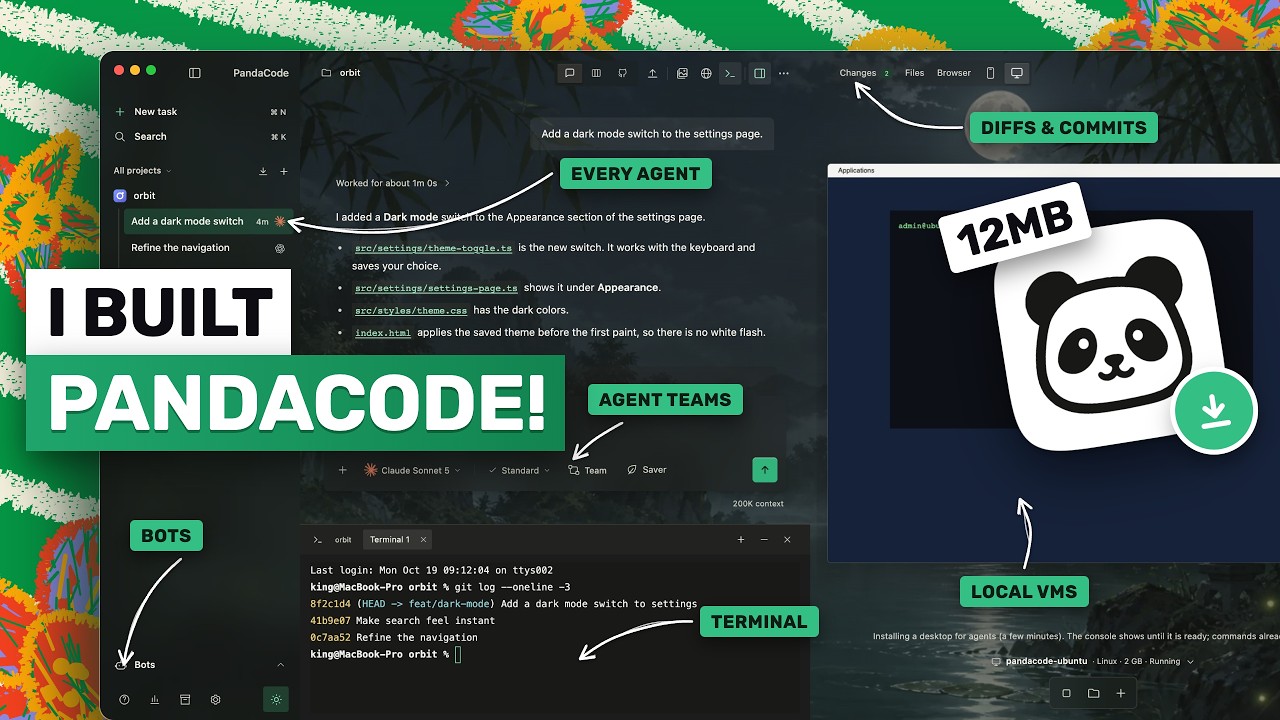
Panda Code is the creator's own project, so treat the video as a guided tour by its author. It wraps coding agents you already have installed and logged into, such as Claude Code and Codex, in one window with a task board, git, a browser and a terminal. The practical value is in the details of how it handles approvals, mid-run messages and parallel work.
"I built the fastest & lightest AI coding agent GUI - 12MB, 4X FASTER, Fully Opensource!" by AICodeKing — Watch on YouTube → The tour is about 12 minutes of a longer video; we summarise what the transcript covers up to the usage-limits panel.
Install and first run
- Get it from the project's GitHub releases page (link in his description): a DMG for Apple-chip Macs, an installer for Windows and an AppImage for Linux. He says it needs no account, licence key or data collection.
- The apps are not signed yet. On a Mac, open System Settings, Privacy and Security, and click Open Anyway. On Windows, click More info then Run anyway on the SmartScreen box. On Linux, run
chmod +xon the AppImage, then run it. - Install Git and at least one coding agent, and log in to it as usual. Panda Code uses your existing plans and logins, so it adds no model cost, and it installs updates in the background only when no agent is working. GLM and Mimo are set up by pasting an API key in settings; he says keys are kept in your computer's keychain.
Working with it
- Tasks and models. Open a project, press Command N for a new task, and pick the agent and model in the prompt box (Claude Code with Opus or Sonnet, Codex with GPT models, Kimi, OpenCode, GLM, Mimo, Grok Build, Antigravity). Each task remembers its model.
- Four permission modes. Standard asks before risky actions; Accept edits lets the agent edit files but asks before commands; Plan is read-only; Full access does everything without asking. He says it maps to each agent's built-in modes rather than adding its own layer.
- Prompt box.
@searches project files; a leading/lists the agent's slash commands and skills, so Claude Code skills work. - Queue versus steer. Enter queues your message until the agent finishes, and you can edit or remove queued messages. Command Enter steers: the message goes into the current run immediately and the agent changes direction. Steering works with Claude Code and Codex; other agents queue.
- Approvals appear as one line above the prompt box with deny and approve, plus approve all when there are several.
- Per-turn diffs. Under each answer you see the files that turn changed, not just the whole branch. The changes panel shows git status and lets you commit. Command J opens a terminal in the task's folder.
- Run button. If the project has a
pandacode run.shfile, a Run button starts the app in its own terminal and opens it in the built-in browser. He says you ask the agents to write and maintain that file. - Worktrees. The branch menu above the prompt box moves a task into a new worktree. "Merge into main" merges the saved commits into main on your computer; it stops and changes nothing if you have uncommitted changes or there is a conflict, then offers to remove the worktree.
- Task board. Four columns: pending, in progress, review, completed. Completed tasks archive after seven days.
- Agent teams. An architect plus up to three workers run in parallel and you can mix agents, for example an Opus architect with a Codex worker and a GLM worker. Named teams are saved in settings and chosen from the model picker. Codex's
/goalcommand keeps it working toward a stated goal and an optional token budget. - Bots and sandboxes. An agent can be connected to Telegram, Slack, Discord, WhatsApp or a local web chat, each bot with its own profile, memory and schedule. On Apple-chip Macs it can run macOS and Linux virtual machines using the free Tart tool, and it supports Daytona, Cloudflare and AWS sandboxes. A deploy menu starts tasks for Vercel, Cloudflare or AWS using their command-line tools and your login, and he says you approve each command.
Gotchas & Caveats
- The speed and memory figures (window opens in about a third of a second, 130 to 160 MB idle, against about 3 seconds and 700 MB for T3 Code) are the author's own tests, not independent measurements.
- Full access mode removes every approval. Use worktrees and Plan or Accept edits first, and check your agent's own documentation for what each mode really allows.
- Unsigned installers trigger operating-system warnings. Download from the repository's releases page and check it is the project you intend to run.
- We have not read the project's code or release page; features are as shown in the video.
Key Takeaways
- Queue a message when the agent should finish first; steer when it is heading the wrong way.
- Give each parallel agent its own worktree, and merge only when committed and conflict-free.
- Mix a strong architect with cheaper workers for the same task, if your tool supports teams.
What you can actually set up from this
Extracted from the video's own transcript — the specifics the original summary left out.
Commands & Code Shown
chmod +x <AppImage file>Purpose: Make the Linux AppImage executable before running it.
When to use: Only for the Linux build; the macOS and Windows builds need the unsigned-app prompts below.
Reproducible steps
- Install
Download from the GitHub releases page: a DMG for Apple-silicon Macs, a Windows installer and a Linux AppImage. The apps are not signed. On macOS open System Settings, then Privacy and Security, then Open Anyway. On Windows click More info then Run anyway. Install Git and at least one coding agent and log in first.
- Use your existing plans
Panda Code does not sell a model. It runs the Claude Code, Codex, Kimi, OpenCode, GLM, Mimo, Grok Build and Antigravity tools you already have. For GLM and Mimo, paste an API key in settings and it runs Claude Code with that key, kept in the system keychain.
- Choose a permission mode per task
Standard (asks before risky actions), Accept edits (edits files, still asks before commands), Plan (read only) and Full access (no prompts). The app uses each agent's own built-in modes.
- Queue or steer while the agent works
Enter queues a message until the run finishes; command-enter sends it into the current run right away. Steering works with Claude Code and Codex; other agents queue.
- Isolate agents with worktrees
Click the branch name above the prompt box to move a task into a new worktree on its own branch, then choose merge into main when done. If there are uncommitted changes or a conflict it stops and changes nothing, and afterwards offers to remove the worktree.
- Run agent teams
The team button gives an architect and up to three workers. The architect plans and splits the work, workers run in parallel and can be different agents, and the architect then reviews and summarises. Named teams can be saved in settings.
- Use the board for many tasks
Four columns: pending, in progress, review and completed. Starting a task launches the chosen agent, completed tasks are archived after 7 days.
Gotchas
- Free and open source, with no account or licence key, and no data collection according to the speaker (he is the app's author, so this is a self-description).
- Performance claims are his own tests: the window opens in about a third of a second and uses about 130 to 160 MB idle, against about 3 seconds and about 700 MB for T3 Code.
- The app updates itself and installs a new version only when no agent is working.
- A project run.sh file (named after the app) gives a run button that starts the app and opens it in the built-in browser; the agents can be asked to write and maintain it.
- Codex supports /goal with an optional token budget and keeps working turn after turn; the video shows a progress banner.
- Bots connect an agent to Telegram, Slack, Discord, WhatsApp or a local web chat, each with its own profile, memory, schedules and rules.
More OpenClaw & Claude Code news
 Your agent can pay: six attacks on x402 payments (price swap, duplicate payment IDs, free shopping, cache, look-alike sellers, prompt injection) and the fix for each
 Claude Code effort levels tested: the same Opus 5.5 build at low, medium, high, extra high and max
 Telling Claude to "make it better" 100 times: the exact prompt, a clean-room setup, and where Sonnet and Opus 5.5 started overbuilding
 Qwen Audio Agent as a voice front end for Claude Code: install, config.env, gateway, and what interruption and cancel really do
 A nightly security sweep with headless Claude Code: logs into S3 and Athena, read-only access, and a green/yellow/red Slack report
 When to fold sub-agents into one agent loop: the decision test, plus Panda Code single chat versus team mode